
Filters
Updated Oct 29, 2026
Entry filters can be used to control when your backtest sits on the sidelines, with no open trade, and waits for the right market conditions to enter a new trade.
These entry filters are only used at trade entry. Once a trade is entered, it will only exit based on the position's exit conditions. It will not exit if your entry filters (defined below) are no longer met.
Options Chain
Premium
This comes with minimum and maximum values and considers premium for the entire trade at entry. If, after selecting all target strikes, the initial mid price is outside of your min/max premium, then the backtest will not enter at that time. It will only enter once your target strikes respect your premium filters. This is based on mid or market price of your trade, not your fill price (which could be different based on slippage).
Volatility
VIX
This comes with optional min and max VIX values. If specified, your backtest position will only open new trades if the current VIX value meets your min and/or max.
IV
This includes optional min and max implied volatility (IV) values for your position's underlying. This IV is measured at-the-money rather than at your specific strike.
Implied volatility changes based on duration. Implied volatility for a strike 1 day to expiration is different from a strike 45 days to expiration, for instance. Our quotes include IV 0, 1, 2, 3, 4, 5, 6, 7, 8, 9, 10, 15, 20, 30, and 45 days to expiration for each underlying. When using IV filters, the backtester will use the IV value that is closest to your position's target days to expiration.
IVR
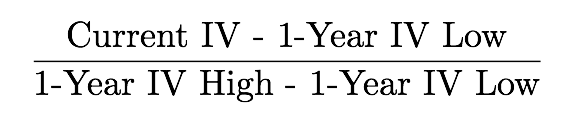
This includes optional min and max implied volatility rank (IVR) values for your position's underlying. IVR represents the current IV relative to IV over the prior year. It is measured from 0-100% wherein 0 represents the lowest IV recorded over the last year and 100% represents the highest IV recorded over the last year. IVR at 60 would indicate that approximately 60% of the prior year's IV readings were below the current level and 40% over IV readings were above.
We calculate IVR as follows:
Implied volatility changes based on duration. Implied volatility for a strike 1 day to expiration is different from a strike 45 days to expiration, for instance. Our quotes include IV 0, 1, 2, 3, 4, 5, 6, 7, 8, 9, 10, 15, 20, 30, and 45 days to expiration for each underlying. When using IV filters, the backtester will use the IV value that is closest to your position's target days to expiration.
IV Diff
This will allow you to restrict entry based on the difference in IV between expirations (DTE) and also optionally over time. You can backtest the IV curve (contango/backwardation) and also target IV expansion or contraction. The IV is measured at-the-money rather than at your specific strike.
IV Diff Examples
Enter when 0 DTE IV is 20% higher than 10 DTE IV:

Enter when 0 DTE IV today is 10% higher than 0 DTE IV a week ago:

How IV is determined n days ago
As you configure these, be aware that some IVs at different DTE will share the same expiration and value, because there is not an expiration on every day, whether because it's a weekend, holiday, or when dailies do not exist. When looking for an IV value in the past, the backtest will use the day that matches exactly, and if there is not one, will continue to go back in time until it finds the next expiration.
If your backtest is running on a Monday and looking at IV 1 day ago, it will use Friday's IV (assuming there was an expiration on Friday). In this case, IV 1, 2, and 3 days ago will all share the same value.
Price Movement
% from Close
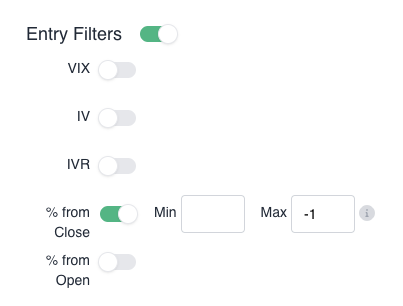
This filter will only allow entries after the underlying has moved a certain percent from the prior closing price. You can specify min and/or max % move from close. This is evaluated at the time of trade entry.
In the example brelow, the backtest will only enter a trade once the underlying is 1% below the prior closing price.
% from Open
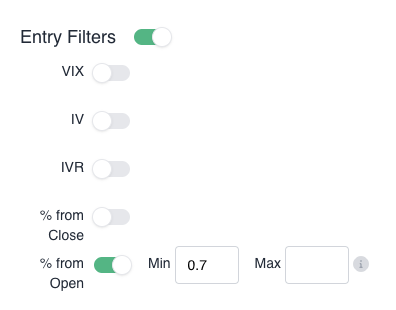
This filter will only allow backtest trades after the underlying has moved a certain percent from the opening price. You can specify min and/or max % move from open. This is evaluated at the time of trade entry.
In the example brelow, the backtest will only enter a trade once the underlying is 0.7% above the opening price.
% from Today's High (ORB)
This filter will only allow backtest trades after the underlying has moved a certain percent from the current session's high price. You can specify min and/or max % move from the high and also optionally start and end time window for the high. The % min and max define how far the underlying price must be from the high price. The time windows will only evaluate the high price between the times that you specify.
These conditions are evaluated at the time of trade entry.
In the example below, the backtest will only enter a trade once the underlying is 0.05% above the high price that the market achieved before 9:45 AM. The backtest can still enter after 9:45 AM. It's just the high price that is confined to 9:45 AM.
This would effectively enter a new trade when the market breaks out above the high price from the opening 15 minutes. This is commonly referred to as an Opening Range Breakout or "ORB" trade.

% from Today's Low (ORB)
This filter will only allow backtest trades after the underlying has moved a certain percent from the current session's low price. You can specify min and/or max % move from the low and also optionally start and end time window for the low. The % min and max define how far the underlying price must be from the low price. The time windows will only evaluate the low price between the times that you specify.
These conditions are evaluated at the time of trade entry.
In the example below, the backtest will only enter a trade once the underlying is 0.05% below the low price that the market achieved before 9:45 AM. The backtest can still enter after 9:45 AM. It's just the low price that is confined to 9:45 AM.
This would effectively enter a new trade when the market breaks down below the low price from the opening 15 minutes. This is commonly referred to as an Opening Range Breakout or "ORB" trade.

% from Prior High
This filter will only allow backtest trades after the underlying has moved a certain percent from the prior session's high price. You can specify min and/or max % move from the high and also optionally start and end time window for the high. The % min and max define how far the underlying price must be from the high price. The time windows will only evaluate the high price between the times that you specify.
These conditions are evaluated at the time of trade entry.
In the example below, the backtest will only enter a trade once the underlying is 0.05% above the high price of the prior session. This is effectively trading when the current price breaks out above the prior session's high.

% from Prior Low
This filter will only allow backtest trades after the underlying has moved a certain percent from the prior session's low price. You can specify min and/or max % move from the low and also optionally start and end time window for the low. The % min and max define how far the underlying price must be from the low price. The time windows will only evaluate the low price between the times that you specify.
These conditions are evaluated at the time of trade entry.
In the example below, the backtest will only enter a trade once the underlying is 0.05% below the low price of the prior session. This is effectively trading when the current price breaks out below the prior session's low.

Technical Indicators
MA Crossover
If you'd like to only enter a new position when two moving averages cross each other, you can do that here.

The above example will allow entry when the 5-minute EMA is 0.1% above the 40-minute EMA. For MA Crossover, you have a number of available Exponential Moving Averages (EMA) and Simple Moving Averages (SMA).
Simple Moving Averages (SMA)
SMAs all use days for the period. 200-day SMA represents the average closing price over the last 200 days. For the current day that the backtest is trading, the backtester will include the intraday underlying price for that day's price. If you are using the 200-day SMA, the average will come from the current intraday underlying price and the 199 daily closing prices before that.
SMAs use unadjusted prices, which can lead to false signals following stock splits.
Exponential Moving Averages (EMA)
EMAs all use minutes for the period. 50-minute EMA represents the average OHLC4 price over the last 50 minutes. OHLC4 is (open + high + low + close) / 4. The backtest will enter a new position on the bar with OHLC4 that meets your criteria.
EMAs reset daily and do not include prices from the prior session. This means that your EMA is not complete until the number of minutes in the EMA length have occurred for the current session. If using a 50-minute EMA while only 5 minutes into the session, the EMA at that point in time will only reflect the average for the first 5 minutes, not 50 minutes. You may wish to restrict backtest entry until a time of day when your EMA calculations are complete for your selected length.
MA Value
To limit entry until the underlying price is above or below a moving average, you can select the MA Value entry filter.

The example above will only allow entry when the underlying price is at least 0.2% below the 50-day SMA. You have a number of available Exponential Moving Averages (EMA) and Simple Moving Averages (SMA) to choose from.
Simple Moving Averages (SMA)
SMAs all use days for the period. 200-day SMA represents the average closing price over the last 200 days. For the current day that the backtest is trading, the backtester will include the intraday underlying price for that day's price. If you are using the 200-day SMA, the average will come from the current intraday underlying price and the 199 daily closing prices before that.
SMAs use unadjusted prices, which can lead to false signals following stock splits.
Exponential Moving Averages (EMA)
EMAs all use minutes for the period. 50-minute EMA represents the average OHLC4 price over the last 50 minutes. OHLC4 is (open + high + low + close) / 4. The backtest will enter a new position on the bar with OHLC4 that meets your criteria.
EMAs reset daily and do not include prices from the prior session. This means that your EMA is not complete until the number of minutes in the EMA length have occurred for the current session. If using a 50-minute EMA while only 5 minutes into the session, the EMA at that point in time will only reflect the average for the first 5 minutes, not 50 minutes. You may wish to restrict backtest entry until a time of day when your EMA calculations are complete for your selected length.
Portfolio
Your backtest's open positions, taken together, behave a bit like a holding in SPX itself. The SPX Beta Weight is how much: 1.0x means the whole book moved like that much of the account's value held in SPX, 0.5x like half of it, and a negative figure means the book was positioned against the market rather than with it.
It is the same statistic as the SPX Beta Weight pill on your dashboard, computed the same way, so a backtest and a live account can be compared directly.
The SPX Beta Weight x filter takes that multiplier: enter 1.5 for 1.5x, the figure ending in x on your dashboard's SPX Beta Weight tile, not the raw beta weight beside it. Setting a minimum, a maximum, or both tells a position when it may enter:
Minimum only. Enter only when the book is already carrying at least this much market exposure.
Maximum only. Enter only when it is carrying at most this much. This is the common one: it stops a strategy from piling more directional risk onto a book that already has plenty.
Both. Enter only inside the band.
Two things worth knowing before you rely on it:
It measures the book as it stands before the candidate trade. The position being considered is not counted in its own filter, so a band of "at most 0.8x" is asking about everything else you have open, not about what you would have after entering.
A moment it cannot price does not pass. If any leg of any open position has no usable quote at that instant, the figure is unknown rather than zero, and an unknown does not satisfy a filter. A filter that admitted trades whenever it could not tell would not be a filter.
GEX
The filters below use our GEX values that are published once daily here. The backtest engine maintains a full historical picture of these GEX values that you can use to filter backtest entries. GEX filters are only available to SPXW backtest positions.
Total GEX
You can restrict backtest trades to current GEX regimes (positive/negative) with optional Minimum and Maximum total GEX filters. Total GEX represents total dealer gamma exposure across all strikes and expirations.
Call Wall
This can restrict backtest trades if SPX is too close to or too far away from the GEX call wall. With this filter in place, you can specify Minimum and/or Maximum distance from the GEX call wall that backtest trades are allowed entry. Positive percentage values will push your filter above the call wall, and negative percentage values will push your filter below the call wall.
Flip Level
This can restrict backtest trades if SPX is too close to or too far away from the GEX flip level. With this filter in place, you can specify Minimum and/or Maximum distance from the GEX flip level that backtest trades are allowed entry. Positive percentage values will push your filter above the flip level, and negative percentage values will push your filter below the flip level.
Put Wall
This can restrict backtest trades if SPX is too close to or too far away from the GEX put wall. With this filter in place, you can specify Minimum and/or Maximum distance from the GEX put wall that backtest trades are allowed entry. Positive percentage values will push your filter above the put wall, and negative percentage values will push your filter below the put wall.
Economic Events
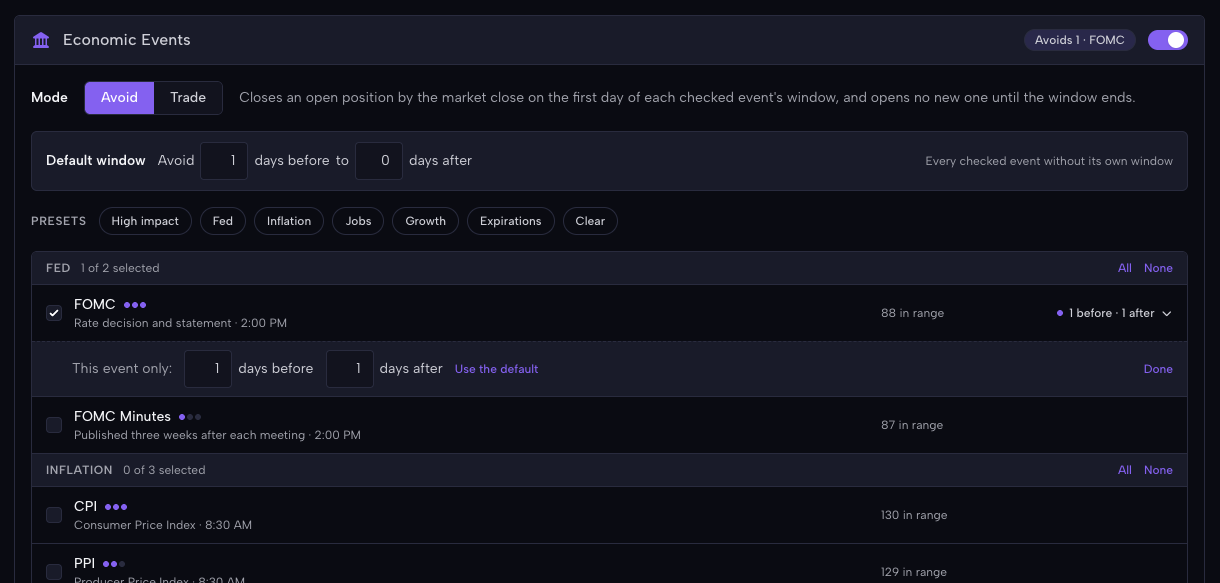
To avoid or specifically trade around scheduled events, use the Economic Events section of the backtest position. It offers the same twelve events as bots and shows how many of the backtest’s trading days your choice covers.
Example: Avoid FOMC
In the example below, the backtest will exit any open trades 1 day before FOMC and then wait to re-enter 1 day after FOMC. If FOMC is on a Wednesday, the backtest will close trades Tuesday at market close and then open new trades Thursday at market open (if your other position entry conditions are met).
Example: Trade FOMC
In the example below, the backtest will only enter new trades on the day of FOMC. For FOMC meetings that are on a Wednesday, the backtest will only enter trades the morning of FOMC (if all other entry conditions are met). It will then hold that trade until 2 days later, exiting by market close on Friday.
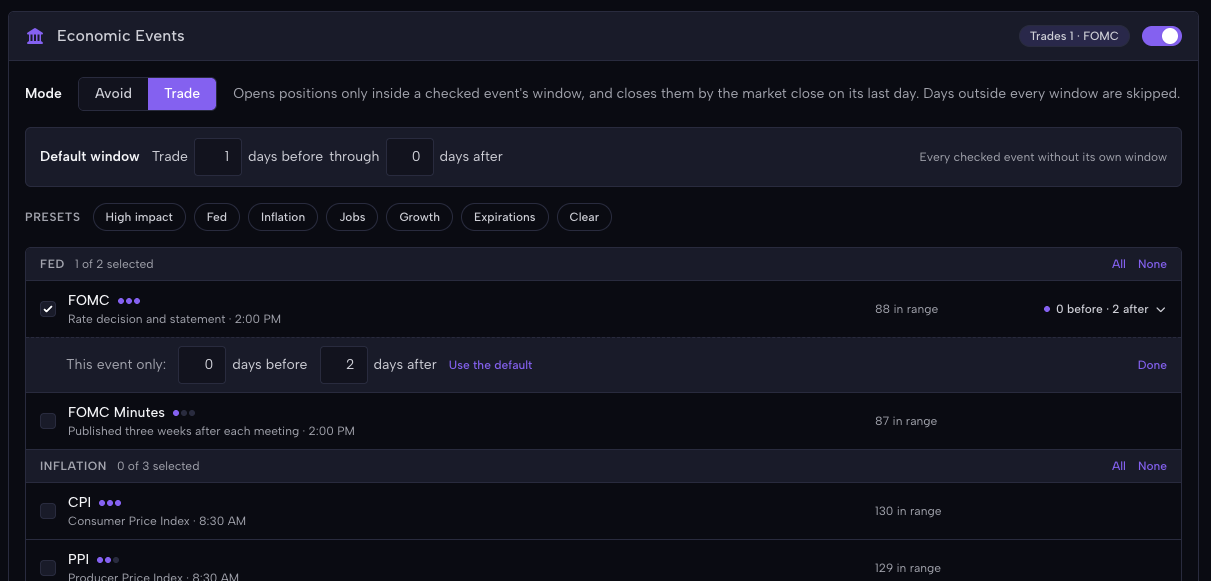
If you'd like to avoid or trade multiple events, go ahead and toggle as many as you'd like!
TIP: Run small backtests before large ones
Some of the entry filters, particularly Economic Events, can be a little confusing to figure out how they work. You may put in a filter and then find that it doesn't do what you anticipated. To avoid wasting your time and money on this, we recommend restricting your backtest start and end date to a tight range while you are trying to figure out the right settings for the backtest. Review the backtest trade log, ensure it is doing what you expect, and then expand the backtest date range to a wide range.
This way you don't waste money running large backtests only to discover that it doesn't trade as you expected!