
Bots Not Running
Updated Oct 13, 2026
If your bots aren't running or doing anything, and you can't figure out why, here are a few things to check:
Your account trading is disabled
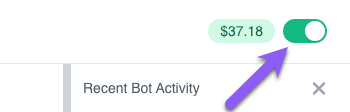
Check the trading switch at the top right of every page. On a phone, tap Menu at the bottom right of the screen: the switch is at the top of the menu. It needs to be on (green) for any of your bots to run. While it is off and you have bots, your dashboard says so at the top.
Brokerage account password changed
Changing your brokerage password can break the connection between Whispertrades and your broker. Each weekday before the open, Whispertrades checks every connection. If one can't be reached for about an hour, it is switched off, and you get an email if bots use it. Your brokers page shows Can't reach your broker with a Reconnect button: click it and sign in to your broker again, and your bots pick up where they left off.
Its broker connection expired
Schwab broker connections require periodic renewal to maintain connection to Whispertrades. If you fail to renew your broker connection within the required timeframe, it will disconnect from Whispertrades, and your bots will stop running. To resolve this, you can view the broker connection at Whispertrades and renew it.
Schwab portfolio margin upgrade
If you recently requested portfolio margin at Schwab, and your bots no longer work, you will likely need to manually manage/close any open positions through Whispertrades. Unfortunately, when Schwab upgrades accounts for portfolio margin, we lose all order history on our end. Whispertrades bots can no longer work with any orders entered prior to this change. You will need to enter new orders (via Whispertrades, not directly through your Schwab account). Once you do this, bots will continue to operate as normal.
Brand new brokerage account
If you just opened your brokerage account, allow a day or two to pass before connecting to Whispertrades. There are some things your broker must do on their end before API access will work.
Bot encountered an error
Bots can recover from most errors that they encounter, but certain errors cannot be recovered from. If a bot encounters an error that it cannot automatically recover from, the bot will stop running. If you want the bot to run again, you can review the error log, take any corrective action as necessary, and then manually disable and re-enable the bot. This will reset any error state in the bot, and the bot will continue running again once re-enable.d